
Introduction to Portable Monitors for Remote Coding
In recent years, the demand for portable monitors has surged, particularly among remote coders and developers who seek efficiency and flexibility in their work environments. As businesses continue to embrace remote work, the necessity for tools that can enhance productivity has become increasingly evident. One of the most effective solutions is the adoption of dual-screen setups, which significantly improve workflow during coding tasks.
Portable monitors are especially appealing to those who require the ability to work from various locations. They provide a practical means of expanding screen real estate, allowing developers to run multiple applications simultaneously. This capability is critical for coding, debugging, and testing, where referencing documentation or running simulations alongside the main code is essential. With the integration of a secondary portable monitor, developers can streamline their processes, reducing the time it takes to switch between tabs or windows.
Moreover, the portability factor is crucial for remote workers. Many developers are not confined to a single workspace; they may work from coffee shops, coworking spaces, or even while traveling. Light-weight, compact monitors offer them the freedom to set up a dual-screen workstation wherever they are. This convenience means that users can maintain their productivity without being tied down by bulky equipment.
In summary, the increasing popularity of portable monitors among remote coders stems from their ability to enhance productivity through dual-screen setups. As remote work continues to evolve, the need for versatile and portable solutions becomes more pressing, underscoring the importance of having reliable tools that adapt to varied working conditions.
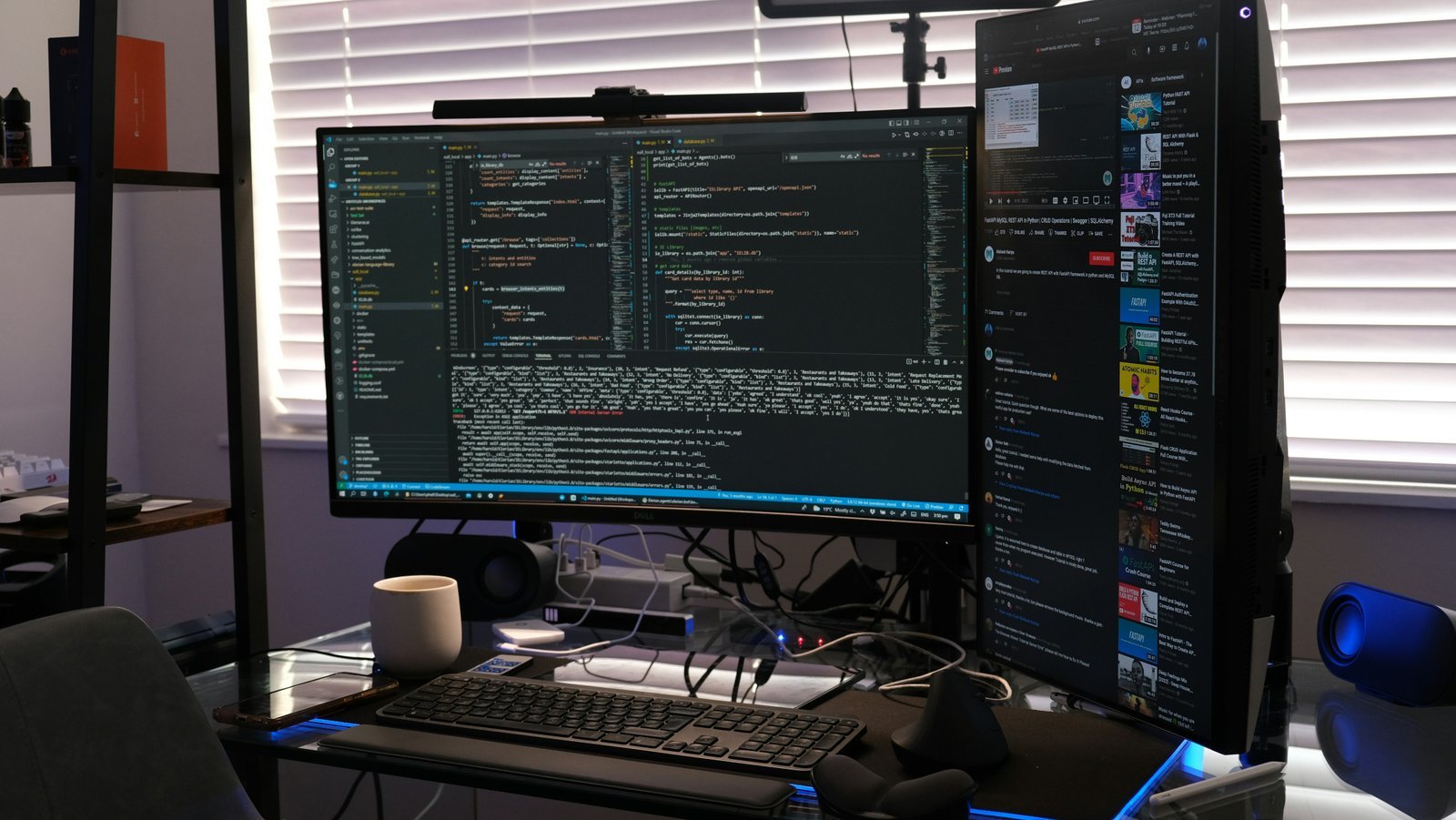
In the modern landscape of programming and software development, the significance of dual-screen setups has grown immensely. Programmers often deal with an array of tasks that require simultaneous access to multiple applications and documents, which is where a dual-screen environment proves exceptionally beneficial. One of the primary advantages is improved multitasking capabilities. Developers can view their code on one screen while referencing documentation, debugging tools, or even tutorials on the other. This eliminates the frequent window switching that can interrupt focus and diminish productivity.
Furthermore, dual-screen setups facilitate better code organization. When working on comprehensive projects, having a dedicated space for coding alongside other resources—such as design mockups or databases—allows for a more streamlined workflow. This spatial awareness significantly enhances a programmer’s ability to manage their work effectively without the clutter of multiple tabs. By placing related materials on separate screens, developers can maintain a clearer mental map of their project, thus reducing cognitive overload.
Ergonomics also play a critical role in the advantages of using dual monitors. With the ability to position screens based on personal comfort, developers can prevent strain and enhance their overall workspace environment. An optimally arranged dual-screen setup not only fosters better posture—keeping the neck and back in healthier alignments—but also encourages longer periods of focus. This combination of comfort and functionality translates into higher efficiency during coding sessions. Ultimately, the benefits of dual-screen setups are undeniable, providing an improved framework for programmers to thrive in their work, thereby boosting productivity and overall job satisfaction.
Key Features to Look for in Portable Monitors
When selecting portable monitors for coding, several key features significantly influence user experience and productivity. The first aspect to consider is display size. A larger screen can enhance visibility and reduce eye strain, making it easier for coders to review lines of code and manage multiple applications seamlessly. Typically, sizes ranging from 13 to 17 inches strike a balance between portability and usability, catering to different workspace environments.
Next, resolution plays a crucial role in clarity and detail. High-definition (HD) or ultra-high-definition (UHD) displays are preferred for coding tasks, as they provide crisp text and vibrant visuals, essential for long hours of programming. A display with a minimum resolution of 1920 x 1080 pixels is often recommended to facilitate effective multitasking.
Weight is another critical feature. Lighter monitors are more convenient for portability, allowing users to easily transport them between workspaces or while traveling. Ideally, a weight of 2 to 3 pounds is manageable for most users without compromising durability.
Connectivity options are equally important. Portable monitors that offer multiple connectivity choices—such as USB-C, HDMI, and DisplayPort—allow seamless integration with a variety of laptops and devices. This versatility ensures that users can easily connect their monitors without worrying about compatibility issues.
Color accuracy cannot be overlooked, especially for those involved in visual aspects of coding, like UI/UX development. Monitors that support a wide color gamut will render colors more accurately, helping users visualize designs better. Finally, consider the operating system compatibility; a monitor that seamlessly interfaces with different OS platforms enhances user efficiency and saves time.
Top 5 Portable Monitors for Remote Coders
In the evolving landscape of remote work, portable monitors have become essential tools for enhancing productivity, especially for professionals in coding and software development. Below, we review the top five portable monitors currently available, focusing on their specifications, performance, and user feedback.
1. ASUS ZenScreen MB16AC
The ASUS ZenScreen MB16AC stands out with its 15.6-inch Full HD display offering a resolution of 1920 x 1080. This monitor weighs just 1.76 pounds, making it remarkably lightweight and easy to transport. It features a USB-C connection, which simplifies the setup process. Users appreciate its auto-rotation capability and eye-care technology, providing a comfortable viewing experience during those lengthy coding sessions.
2. Dell P2418HC
The Dell P2418HC is a versatile 24-inch portable monitor that combines performance with practicality. Its 1920 x 1080 resolution and excellent color accuracy make it ideal for detailed coding work. This monitor includes an integrated USB-C hub, allowing for simplified connectivity. Users have reported high satisfaction with its adjustable stand design, which accommodates various working positions.
3. Lenovo ThinkVision M14
The Lenovo ThinkVision M14 is acclaimed for its ultra-slim profile and lightweight design of 1.3 pounds. It offers a 14-inch Full HD display with 1920 x 1080 resolution, making it an excellent choice for remote coders who need portability without compromising on screen quality. Feedback highlights its impressive color reproduction and flexibility, as it can be adjusted for optimal viewing angles.
4. AOC I1601FWUX
The AOC I1601FWUX features a 15.6-inch portable display designed specifically for on-the-go professionals. This monitor provides a Full HD resolution of 1920 x 1080 and utilizes a USB-C connection for easy operational setup. Users have given positive reviews regarding its flicker-free technology, which reduces eye strain during extended usage, making it beneficial for coders.
5. HP EliteDisplay S14
The HP EliteDisplay S14 is another excellent choice for remote coders, providing a 14-inch screen with Full HD capabilities. Its lightweight and portable design, along with its USB-C connectivity, ensures high accessibility for users. The monitor’s superior brightness and adaptive contrast enhancement features are highly praised, allowing coders to work effectively in varying lighting conditions.
These portable monitors represent some of the best options available for remote coders, each offering unique features that cater to different needs while not compromising on performance.
Comparison of Connectivity Options
When selecting a portable monitor for dual-screen remote coding, the importance of connectivity options cannot be overstated. Various ports and cables influence the efficiency of your setup, affecting how seamlessly your devices collaborate. In this regard, three primary connectivity options stand out: USB-C, HDMI, and DisplayPort, each offering distinct advantages and challenges.
USB-C has gained significant traction in recent years, becoming a popular choice among modern laptops and devices. Its versatility allows for the transmission of data, video, and even power through a single cable, streamlining your workspace. For coding purposes, USB-C enables easy connection to laptops and tablets, ensuring that you can quickly switch between different devices without the need for multiple adapters. Moreover, the compatibility of USB-C with various operating systems further enhances its appeal for remote coding scenarios.
HDMI ports, on the other hand, have long been a standard in the realm of video connectivity. Most monitors and laptops come equipped with HDMI ports, making this type of connection straightforward and widely supported. While effective for video transmission, it is important to note that HDMI does not typically support power delivery, meaning additional power sources may be necessary, especially in portable setups. However, for those with a reliable power source, HDMI remains a robust option for achieving high-definition visuals.
Lastly, DisplayPort offers superior performance and is especially favored for uses that demand high refresh rates and resolutions. While less common on laptops compared to HDMI, DisplayPort excels in connecting multiple displays with a single output, making it ideal for a dual-screen configuration. Moreover, its support for adaptive sync technologies makes it beneficial for coding environments requiring careful visual precision.
In conclusion, the choice of connectivity options for a portable monitor significantly impacts your coding productivity. Each connection type has its own strengths, and understanding these can help you make an informed decision tailored to your remote coding needs.
User Experiences: Testimonials and Reviews
As the demand for portable monitors rises, numerous users have shared their experiences regarding the effectiveness and functionality of these devices, particularly for coding tasks. Testimonials from professionals such as software developers and designers provide valuable insights into how different models perform in real-world scenarios. For instance, a user highlighted their experience with the XXX Portable Monitor, stating that its lightweight design and excellent screen clarity significantly enhanced their dual-screen setup. This dual configuration allowed them to code more efficiently, managing multiple projects simultaneously without straining their eyes.
Another user shared their experience with the YYY Monitor, emphasizing its exceptional color accuracy and sharpness, which contributed to improved productivity during long coding sessions. The added screen space facilitated easier debugging and resource management, proving to be a game-changer for their remote coding work. Furthermore, many users have noted the importance of connectivity options offered by these portable monitors. The ease of linking to laptops through HDMI and USB-C ports is frequently mentioned, illustrating the convenience these monitors bring to on-the-go professionals.
Conversely, some reviews indicate frustration with battery life in certain models, suggesting that prospective buyers carefully consider power management features. A user reported that while the ZZZ Monitor offered impressive visuals, its limited usage time without plugging in was a drawback for their travel needs. Overall, user testimonials demonstrate a wide range of experiences with portable monitors, underscoring the significance of choosing a model that combines performance, usability, and portability. By examining real-world feedback and expert evaluations, potential buyers can gain a clearer understanding of which monitor will best support their remote coding requirements.
Setting Up a Dual-Screen Coding Environment
Creating an effective dual-screen coding environment using portable monitors can significantly enhance productivity. To begin with, it is essential to choose the right portable monitors that align with your specific needs, including size, resolution, and connectivity options. While setting up, consider positioning the monitors so that they complement each other in terms of visual ergonomics. Ideally, the screens should be aligned at eye level to reduce strain on the neck and eyes, allowing for a more comfortable coding experience.
After physical placement, the next step involves adjusting the display settings. For Windows users, accessing the display settings is straightforward; simply right-click on the desktop and select “Display settings.” Here, you can manage orientation, resolution, and scale for each monitor. Ensuring both monitors have the same resolution will provide a seamless transition when moving your cursor between screens. Similarly, Mac users can navigate to “System Preferences” and select “Displays” to arrange their monitors appropriately.
Moreover, optimizing software configurations is a crucial part of setting up your dual-screen environment. Many Integrated Development Environments (IDEs) and code editors offer flexibility in window arrangement. For instance, placing your code editor on one screen while utilizing the other for a terminal, documentation, or web browser can streamline your workflow. Additionally, utilizing virtual desktops might help organize projects and tasks more efficiently. Lastly, ensure that you periodically review your setup to identify areas of improvement, which can enhance your overall coding efficiency.
Maintenance and Care for Portable Monitors
To ensure the longevity and optimal performance of your portable monitor, it is essential to follow specific maintenance and care practices. These practices can help you prevent potential issues while also enhancing your overall user experience.
Firstly, regular cleaning is crucial. Dust and fingerprints can accumulate on the screen and casing, affecting visibility and performance. Use a microfiber cloth slightly dampened with water or a mild screen cleaner specifically designed for electronics. Avoid household cleaners, as they may damage the display’s coating. Gently wipe the surface in circular motions to remove any debris without applying excessive pressure.
In addition to cleaning, protecting your portable monitor during travel is vital. When transporting your device, always use a padded case or sleeve that fits snugly around it. This added layer of protection prevents scratches and dings that can occur from accidental bumps. Ensure that it is stored securely in your bag to avoid movement during transport, which could lead to damage.
Furthermore, be mindful of environmental conditions that can affect the performance of your monitor. Avoid exposing the device to extreme temperatures, humidity, or direct sunlight, which may damage electronic components. Whenever possible, store your portable monitor in a cool and dry place. Taking these precautions can help maintain the device’s functionality and appearance over time.
Lastly, regularly check for software updates from the manufacturer, as these updates may improve performance and fix bugs. Keeping your monitor’s firmware up to date can significantly enhance your coding productivity. By integrating these best practices into your routine, you can ensure that your portable monitor remains a reliable tool for dual-screen coding.
Conclusion: Choosing the Right Portable Monitor for Your Needs
In the current landscape of remote work, selecting the right portable monitor is crucial for enhancing your coding experience and overall productivity. As demonstrated throughout the discussion, various factors such as screen size, resolution, weight, connectivity options, and battery life significantly influence the effectiveness of a portable monitor. Evaluating your specific coding requirements will ensure that the monitor you choose aligns with your professional needs.
For instance, a larger screen with high resolution may be beneficial for developers working on complex software projects, while a lightweight option with versatile connectivity might be more suitable for those who frequently travel for work. Additionally, a portable monitor that seamlessly integrates with your existing laptop can allow for a more efficient dual-screen setup, enhancing multitasking capabilities. Understanding the importance of color accuracy and viewing angles is also critical, particularly for developers engaged in graphic design or web development tasks.
Moreover, it is essential to think about your usual work environment when choosing a portable monitor. If you primarily work in cafes or shared spaces, features such as glare resistance and battery longevity can play a pivotal role in selecting the right device. Equally, considering aspects such as durability and warranty can provide added assurance in your investment.
Ultimately, the best portable monitor for dual-screen remote coding will be the one that not only meets your technical specifications but also enhances your workflow. We encourage readers to carefully assess their coding habits, work locations, and technical needs to make an informed decision. By prioritizing these elements, you can significantly elevate your productivity and comfort during coding sessions.